Paying and working from Russia
How to pay for AI models, code editors, hosting, domains and SEO services from Russia and what to do when a service does not open - one list by the tasks that come up while making a site AI-ready
How payment works
Section titled “How payment works”The payment links lead to a Russian-language service. The account is topped up in rubles, and the subscription or balance of the foreign service is paid from it. Each service has its own page with the steps.
A subscription and an API are separate accounts. A ChatGPT subscription does not pay for an OpenAI API key, and the reverse: if a utility needs a key, pay for the API.
AI models
Section titled “AI models”They are needed to check what they answer about your site and to run the prompts. How to count mentions: How to measure AI visibility.





API keys
Section titled “API keys”A key is needed by utilities such as llmstxt-architect and by your own scripts. It is a separate account, not a chat subscription.


Code editors and agents
Section titled “Code editors and agents”An editor with a model inside is a handy place to build and check llms.txt right in the site repository.



Site builders
Section titled “Site builders”For when there is no site yet. What a finished site should have: An AI-ready site.






Hosting and builds
Section titled “Hosting and builds”The file does not go stale when it is built together with the site. On Markdown for agents: Markdown versions of pages.









Clouds
Section titled “Clouds”Storage, servers and models by API from the large providers.





Domains
Section titled “Domains”llms.txt is read from the domain root, so your own domain matters more than an address on someone else’s platform.


SEO services
Section titled “SEO services”They show rankings, links and mentions of a site. What in their numbers can be trusted: AI Search Optimization.


Automation
Section titled “Automation”Rebuild the file on a schedule, check links, send a report - with no code of your own.



Where tasks, designs and the knowledge base live.





Credentials
Section titled “Credentials”API keys do not belong in a repository - a password manager is the place for them.



Text and images
Section titled “Text and images”Tools for site materials.


When a service does not open
Section titled “When a service does not open”A paid subscription does not help when the service is closed to Russian addresses. Access is set up first, payment comes second.
Сетевые настройки
Access to services that do not open from Russia
What is available in Russia
Section titled “What is available in Russia”Alice answers can be checked with no payment and no network setup. A site on Webasyst has extensions for llms.txt and JSON-LD.
Яндекс Браузер
Alice is built into the browser: answers about a site are checked with no payment or network setupЯндекс Браузер: инструкция
Yandex's own page with step-by-step install and setup, in RussianЯндекс KIT
An online store builder paid in rublesSourceCraft
Yandex's counterpart to GitHub: repositories, builds and site hostingVibecraft
A site or web app from a chat description, with publishing and your own domain
Yandex search in any browser
Section titled “Yandex search in any browser”Whether a site made it into Alice’s answers and Yandex results is easiest to check straight from the address bar. Yandex is not built in everywhere, though: Firefox does not list it among its search engines on desktop or on phones. There are two ways to bring it back.
With an add-on. Firefox on desktop and on Android has the Yandex Search add-on. It makes Yandex the default search in the address bar and adds the @ya keyword for a query from any tab.
By hand. This works in any browser, including those that take no add-ons, such as Firefox on iPhone:
-
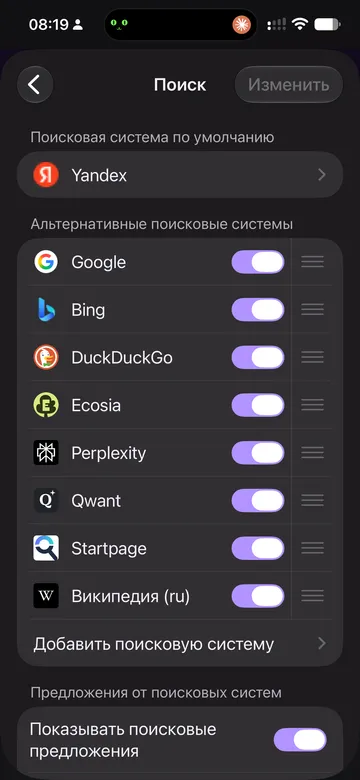
Open the browser settings and the Search section.
-
Choose “Add search engine”.
-
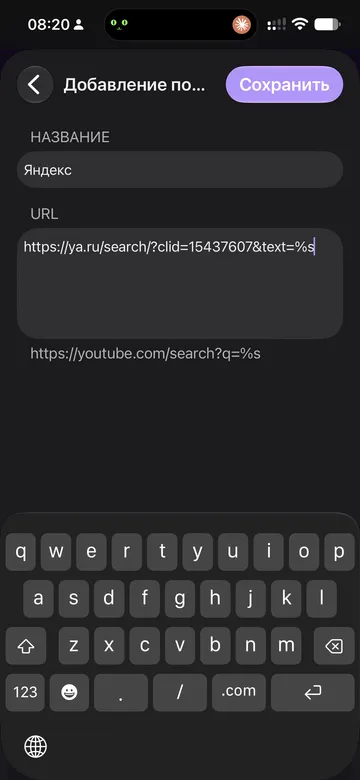
Type “Yandex” as the name and paste the search address into the URL field:
https://ya.ru/search/?clid=15437607&text=%s -
Save and pick Yandex as the default search engine.
The same steps in Firefox on iPhone:
In Chrome and browsers built on it the same settings section is called “Search engine”, and a new entry is added under “Manage search engines”.